Opened once.Sold again.
Open box returns, damaged stock, demos and ex-display units are money sitting on a shelf. Grade them A to D and RepairStep lists them back on your WooCommerce store - on the product page your customers already visit.
Free to start. No credit card required.
Where the stock comes from
Every return, three choices.
Decide what happens to each return - RepairStep handles the processes, helping you sell it, fix it, or claim it back.
Unopened?
Back to stock
Nothing wrong with it - back on the shelf to sell as new.
Opened or used?
Grade it, resell it
Grade the unit and list it on your own store at a discount. This is where the money comes back.
Faulty?
Claim it, or repair it
Send it to your supplier as a warranty claim, or book it in for repair. Either way the process runs in RepairStep and the customer stays in the loop.
On your storefront
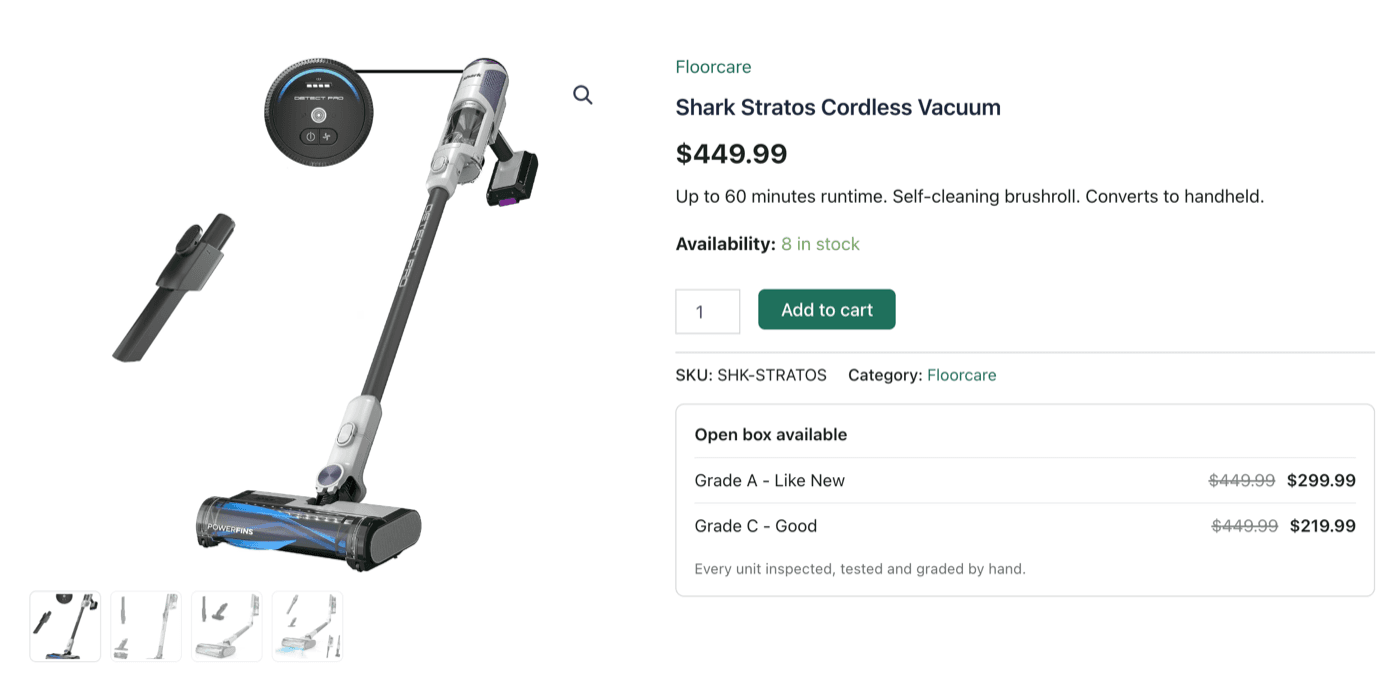
Open box, right on your WooCommerce product page.
Your customer is on the full-price page and has no idea the open box one exists. So that is where the offer appears - next to buying new, with the grade, the price and the saving.
A deal for a buyer who would not have paid full price, and a sale you would not otherwise have made. When the last unit sells, the offer removes itself.
Its own page
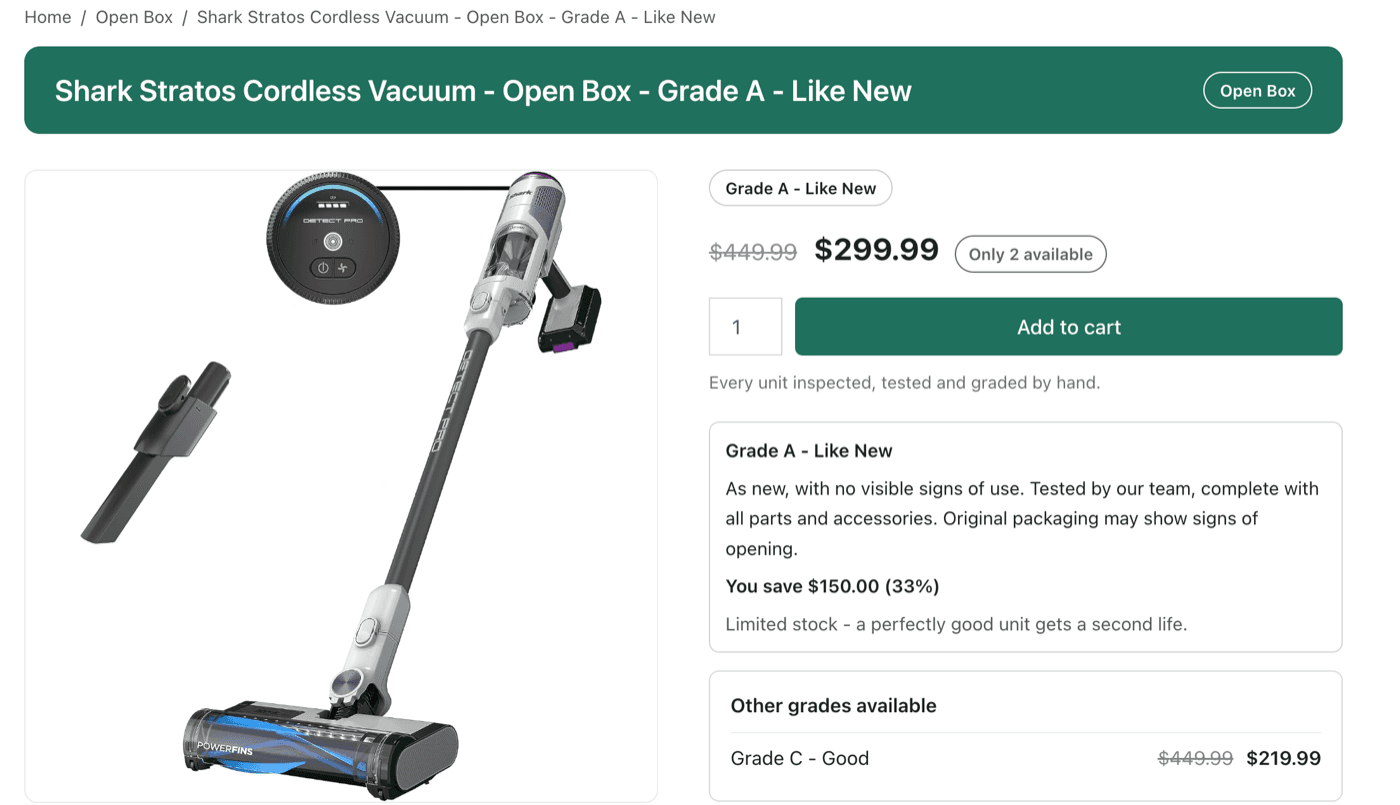
Every grade gets its own page.
Gallery, grade, the condition in plain words and the saving - built automatically, with your theme’s header, footer and fonts left exactly as they are.
Each grade is its own page, so a Grade A and a Grade C never compete in one listing - and each one links to the others.
Setting up
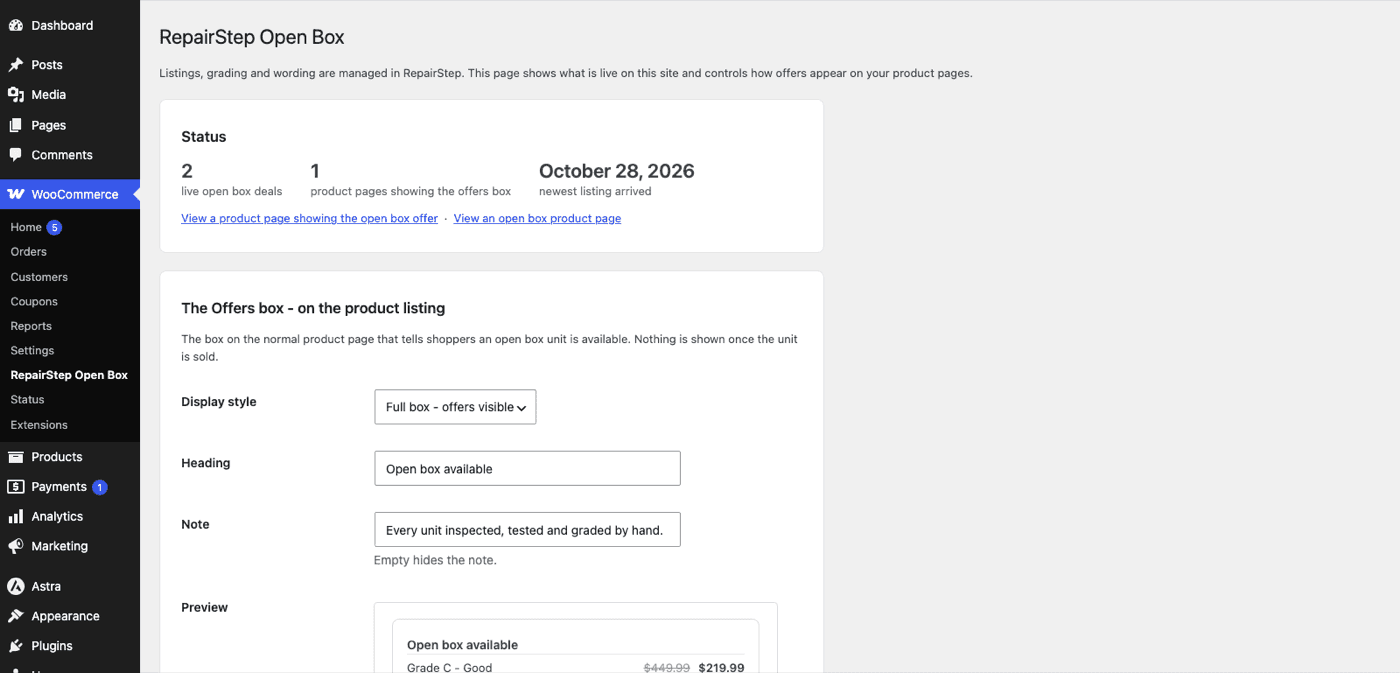
Set up in one screen.
- Install the free plugin from the WordPress plugin directory
- Create a WooCommerce REST API key with Read/Write permission
- Paste it into RepairStep, and list your first unit
After that the settings screen shows what is live, where the offer appears, and a preview of it as you type.
More than returns
Returns are just the start.
When a unit is faulty, a real process starts - a supplier claim or a repair - and the software running it is a full repair system, built in, not a returns feature.
Manage customer repairs
The details arrive with the repair request.
- Customers request a repair from a form on your own site - product and purchase details captured up front
- The whole repair on one page: photos, notes, emails, supplier replies
- Customers watch progress on their own tracking page - no "any update?" calls
Doing the repairs yourself? See the full repair workflow →
Pricing
One open box sale covers it.
The WordPress plugin itself is free.
First 5 listings free, then $9/month
Try it on your next return - grade it, list it, see it sell.
Included on paid plans
On the Store or Distributor plan, open box listing is included at no extra cost.
Full plan details on the pricing page.
FAQ
Still have questions?
- How do I sell open box items on WooCommerce?
- Install the free plugin and connect your store to RepairStep.
- Record the unit in RepairStep, grade it A to D and set the price.
- List it - the open box option appears on your original product page, and on its own open box page.
- When the unit sells, the sale is recorded and the offer disappears on its own.
- Do I need a RepairStep account?
- Yes. RepairStep is where the work happens - you record the returned unit, grade it and set the price, and it appears on your store. The plugin is the shop window.
- Where do the open box offers appear?
- On the original product page - the same page your customers already visit - with the open box option shown next to buying new. Open box stock also gets its own pages, created automatically.
- Can customers browse all my open box stock in one place?
- Yes. Every open box product joins an Open Box category automatically, giving you a single page of everything you have for sale - ready to add to your menu.
- Can I sell ex-display, demo, refurbished or B-stock units too?
- Yes - anything you can grade, not just customer returns. Add the unit in RepairStep, grade it and list it the same way. Faulty units go to repair or a supplier claim instead.
- Does it change my original product?
- No. Its price, stock and description stay exactly as they are. RepairStep only adds a hidden note linking it to its open box offers.
- Does it work with products that have sizes or colours?
- Yes. When you list a unit, you choose the exact variation it came from.
- Will it match my theme?
- Yes. Your header, footer, fonts and colours stay as they are. You can use RepairStep's open box page design, your own theme's product template, or place the pieces yourself if you build pages with Divi, Elementor or similar.
- Do I still control my own prices?
- Yes. Open box products are ordinary WooCommerce products - change the price, description or photos in WooCommerce whenever you like and RepairStep picks the change up.
- What happens when a unit sells?
- The sale is recorded in RepairStep automatically and the offer disappears from your product page on its own. Nothing is left behind for you to tidy up.
- Does the plugin send my data anywhere?
- No. It makes no external requests at all - no tracking and nothing loaded from other servers. RepairStep connects to your store the other way around, using WooCommerce API keys you create and can revoke at any time.
- What does it cost?
- The plugin is free. RepairStep is free to set up and your first 5 listings are included. After that open box listing is $9 a month, and it is included at no extra cost on the Store and Distributor plans.
Whatever comes back, handled.
Returns sold, repairs managed - start with your next return.